New Improved Firebug Works with Firefox 5+ Webmonkey Wired.com
Updated: 2011-07-29 21:22:15

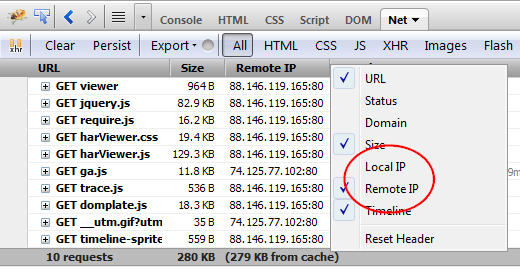 Skip to content hacks.mozilla.org Home Go Home Articles Demos About Home Articles Firebug 1.8 New Features Older Article on July 29, 2011 by Honza in Firebug No comments yet Firebug 1.8 compatible with Firefox 5.0 has been released and I would like to get this opportunity and introduce some new features in this . version Firebug 1.8 has been also uploaded to AMO but it can take some time to . appear First of all , check out the following compatibility : table Firefox 3.6 with Firebug 1.7.3 Firefox 4.0 with Firebug 1.7.3 Firefox 5.0 with Firebug 1.8 and also Firebug 1.7.3 Firefox 6.0 with Firebug 1.9a0 and Firebug 1.8 as soon as 6.0 is out Firefox 7.0 with Firebug 1.9a0 Firefox 8.0 with Firebug 1.9a0 console.timeStamp( There is a new API that can be used to create time-stamps during
 Projects Hacks Discussions Get Involved About Prospector home Archives Jul 26 11 Snaporama extends the life of your tabs We’ve recently been experimenting with how to use Tab Groups aka Panorama more effectively . Today , we’re releasing an add-on called Snaporama . This add-on lets you instantly take a snapshot” of all the tabs you have open , and later lets you open up a snapshot into a new tab group . This is based off an existing feature in Firefox that lets you bookmark groups of tabs . The workflow is designed to be as simple as . possible 1. You have a set of pages open that you’d like to snapshot for . later 2. You click the camera icon to create a snapshot and give it a : name 3. Later on , you go to your snapshots gallery and open a snapshot into a new Panorama : group 4. That’s
 Google is testing a fresh and cleaner layout for web search and other search properties. See screenshot images.
 : Wired Webmonkey Web Dev Design Ajax Backend Blog Publishing CSS Databases Fonts Frameworks HTML HTML 5 JavaScript Mobile Multimedia Programming Security UI UX Web Standards Software Apps Browsers Software Web Apps Platform APIs APIs Identity Location Social Web Services Reference Color Charts HTML Cheat Sheets Special Characters Glossary Templates Code Snippets twitter facebook RSS Feeds Search : for Jul 25 2011 File : Under CSS HTML5 Software Tools Screenfly : The Easy Way to Test Responsive Web Designs By Scott Gilbertson Testing websites with Screenfly If you’ve embraced responsive web design and we sincerely hope you have you know that fluid layouts , helpful as they are , can be tricky . Combine them with media queries to re-size and re-position elements on the fly and you’ll: Wired Webmonkey Web Dev Design Ajax Backend Blog Publishing CSS Databases Fonts Frameworks HTML HTML 5 JavaScript Mobile Multimedia Programming Security UI UX Web Standards Software Apps Browsers Software Web Apps Platform APIs APIs Identity Location Social Web Services Reference Color Charts HTML Cheat Sheets Special Characters Glossary Templates Code Snippets twitter facebook RSS Feeds Search : for Jul 25 2011 File : Under CSS HTML5 Software Tools Screenfly : The Easy Way to Test Responsive Web Designs By Scott Gilbertson Testing websites with Screenfly If you’ve embraced responsive web design and we sincerely hope you have you know that fluid layouts , helpful as they are , can be tricky . Combine them with media queries to re-size and re-position elements on the fly and you’ll
 Semagic is a windows client application for weblogs based on LiveJournal engine. A LiveJournal client to help you with your work.
Semagic can perform spellchecking either via MS Word or using internal spellchecker which is based on MySpell library. Spellchecking via MS Word was initially...
Semagic is a windows client application for weblogs based on LiveJournal engine. A LiveJournal client to help you with your work.
Semagic can perform spellchecking either via MS Word or using internal spellchecker which is based on MySpell library. Spellchecking via MS Word was initially...
 Wired Webmonkey Web Dev Design Ajax Backend Blog Publishing CSS Databases Fonts Frameworks HTML HTML 5 JavaScript Mobile Multimedia Programming Security UI UX Web Standards Software Apps Browsers Software Web Apps Platform APIs APIs Identity Location Social Web Services Reference Color Charts HTML Cheat Sheets Special Characters Glossary Templates Code Snippets twitter facebook RSS Feeds Search : for Jul 22 2011 File : Under Programming Software Tools Add a Little 3D Tilt’ to Your Website By Scott Gilbertson Webmonkey.com Tilted Tilt is a great new Firefox extension that uses a 3D model to visualize any web page DOM Tilt is a Firefox add-on , but it’s in the very early stages of development so you’ll need to manually install it . Head over to GitHub to download a copy and then drag the
 : Skip to content hacks.mozilla.org Home Go Home Articles Demos About Home Demos Tilt : Visualize your Web page in 3D Older Article Newer Article on July 20, 2011 by Paul Rouget in Add-ons Demo Developer Tools WebGL 62 comments Tilt is a Firefox extension that lets you visualize any web page DOM tree in 3D . It is being developed by Victor Porof 3D developer responsible with the Firefox extension itself along with Cedric Vivier creating a WebGL optimized equivalent to the privileged canvas.drawWindow , see 653656 and Rob Campbell who first thought about creating a 3D visualization of a webpage Everything started initially as a Google Summer of Code project , but now , with an enthusiastic team behind it and so many new features and ideas , it has become an active Developer Tools . projectWired Webmonkey Web Dev Design Ajax Backend Blog Publishing CSS Databases Fonts Frameworks HTML HTML 5 JavaScript Mobile Multimedia Programming Security UI UX Web Standards Software Apps Browsers Software Web Apps Platform APIs APIs Identity Location Social Web Services Reference Color Charts HTML Cheat Sheets Special Characters Glossary Templates Code Snippets twitter facebook RSS Feeds Search : for Jul 22 2011 File : Under Programming Software Tools Add a Little 3D Tilt’ to Your Website By Scott Gilbertson Webmonkey.com Tilted Tilt is a great new Firefox extension that uses a 3D model to visualize any web page DOM Tilt is a Firefox add-on , but it’s in the very early stages of development so you’ll need to manually install it . Head over to GitHub to download a copy and then drag the
 You aren't signed in Sign In Help Home The Tour Sign Up Explore Explore Page Last 7 Days Interesting Popular Tags Calendar Most Recent Uploads Video on Flickr Galleries Explore Analog Flickr Clock Getty Images World Map Places The Commons Creative Commons FlickrBlog code.flickr The App Garden Camera Finder Upload To take full advantage of Flickr , you should use a JavaScript-enabled browser and install the latest version of the Macromedia Flash Player Favorite Actions Share via email Share on Facebook Share on Twitter Newer Older nodonut Comments and faves Want to format your comment By kabelphoto No real name given Add Contact This photo was taken on March 1, 2011 9 views 0 comments 0 favorites 0 galleries This photo belongs to kabelphoto's photostream 26,859 This photo also appears in
 : Home Archive 2011 June 26 Previous Next Mozilla Osborne By Dave Winer on Sunday , June 26, 2011 at 8:20 . AM Who is Osborne Exactly Osborne Computer Corp famously committed suicide in 1983 by announcing a new product before it was ready to ship , thereby killing their cash cow the previous product and killing their cash , flow and killing themselves . nbsp I'm very much afraid Mozilla is doing that with Firefox . If you use Firefox 3.6 you should assume that , after August , there will be no more fixes , security or otherwise . If you want to get on board with their process , you'll need to start using Firefox 4. But wait a minute . Firefox 4 is dead too . You need to be using Firefox 5. And that will be dead in a few months , replaced by Firefox 6. And so on . Here's the problem . If
 Multtiple is a Adobe AIR application, a social network client for Twitter and Tumblr. You will be able to view all the information from your entire timeline.
"Column mode" that shows the multiple timelines on the screen, and "Tab mode" that shows the one timeline on the screen...
Multtiple is a Adobe AIR application, a social network client for Twitter and Tumblr. You will be able to view all the information from your entire timeline.
"Column mode" that shows the multiple timelines on the screen, and "Tab mode" that shows the one timeline on the screen...
 I’m working on a mobile app that requires a lot of skinning and since Flex 4 we’ve gotten a MUCH improved skinning model for Flex. Unfortunately, with Flex mobile, for performance reasons it’s a good idea to use ActionScript-only skins which means going back to the world of Flex 3 and diving into the component [...]
 Windows Live Writer is a desktop application that makes it easy to publish rich content to your blog. Windows Live Writer is a desktop application that makes it easier to compose compelling blog posts using Windows Live Spaces or your current blog service.
Blogging has turned the web into a...
Windows Live Writer is a desktop application that makes it easy to publish rich content to your blog. Windows Live Writer is a desktop application that makes it easier to compose compelling blog posts using Windows Live Spaces or your current blog service.
Blogging has turned the web into a...